

Every machine running your app, free or paid
See installs, active devices, versions, and platforms in one view, without handing out a single key. A free install is a device with a number, not a guess.
Start Free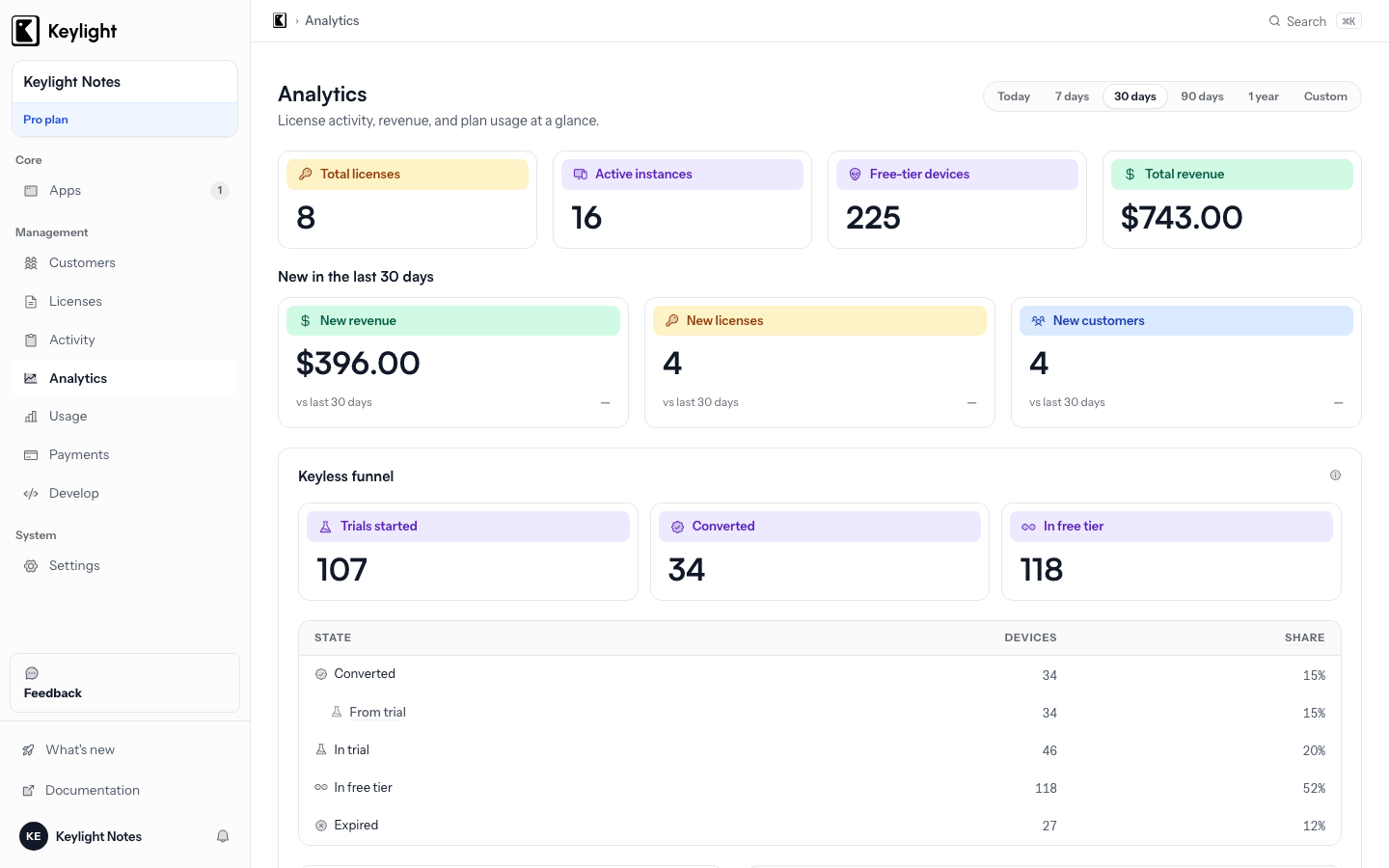
- Free users become visible
- A free install registers as a real device the first time it launches. No key, no signup, no account. It shows up in the dashboard with a number.
- Real machines, not check-ins
- Devices are recognised by a one-way machine hash, so a reinstall or an OS update is the same device, not a second one.
- Free to paid, counted once
- When a free device buys a key, it stays one device. The dashboard shows the flip, not a duplicate.
- Versions, platforms, countries
- Daily, weekly, and monthly active devices, version adoption, platform split, and a country map. All from the calls the SDK already makes.
Updated September 2026
The gap it closes
Free users used to be invisible. No key, no activation, no row anywhere. You knew your download count and your paying count, and the space between them was a guess. Was the free tier converting? Were people even opening the app? Nobody could say.
With Keylight a free install is a device with a number. The first time the app launches, the SDK registers the machine and the dashboard shows it, alongside the paid devices, in the same list. You see how many machines run your app, which version they are on, and the moment one of them pays.
What the beacon sends, and what it does not
On launch the SDK sends a small beacon. It carries a one-way hash of the machine, the app version, the SDK version, and the platform. That is the whole payload.
It does not send a name, an email address, a file path, a browsing history, or a raw hardware serial. The hash is made on the device from a stable platform identifier mixed with your product, then hashed one way. Keylight stores an opaque string it cannot turn back into a device. The licensing without license keys post explains where the privacy line sits and why the hash is built that way.
The beacon ships today in the Swift, JavaScript, Rust, and C++ SDKs. The C# SDK is in Alpha and does not send it yet.
Real machines, not check-ins
A device count is only useful if it counts devices. A hand-rolled version usually counts installs, which means a reinstall is a new row and the numbers drift upward for the life of the product.
The Keylight hash comes from the machine, not the install. A reinstall, an OS update, or a wipe of the app’s data lands on the same row. The dashboard shows how many real machines run your app, not how many times the app was set up.
Free to paid, counted once
When a free device buys a key and activates, it does not become a second device. The same machine hash links the free row and the paid activation, so the dashboard shows one device that flipped, with its first-seen date intact. Your free-to-paid number is a real conversion rate, not two lists that happen to overlap.
What the dashboard shows
- Daily, weekly, and monthly active devices, free and paid, across all your products.
- Version adoption, so you know who is still on the old build before you drop support for it.
- Platform split, macOS, Windows, Linux, and the rest.
- A country map of where the app is actually running.
None of this needs a separate analytics package. The signal rides the launch, activation, and validation calls the SDK already makes. The usage analytics page covers the paid side in more depth, and which version and platform your paying users are on shows the deprecation decisions the numbers drive.
The device dashboard is included on every Keylight plan. See Pricing, starting at $19/month. For a free tier inside a direct-sold Mac app, see Licensing for macOS Apps.
Frequently asked
How do I see free users if they never enter a key?+
The SDK sends a small beacon on launch: a one-way hash of the machine, the app version, and the platform. That is enough to count the device and show it in the dashboard. No key is needed and none is handed out.
What does the beacon send?+
A hashed machine identity, the app version, the SDK version, and the platform. It does not send a name, an email, a file path, or a raw hardware serial. Keylight cannot turn the hash back into a device.
Does a reinstall count as a new device?+
No. The hash comes from the machine, not the install, so it survives a reinstall, an update, or a wipe of the app's data. The same device folds into the same row.
Does this add an analytics SDK?+
No. The numbers ride the launch, activation, and validation calls the Keylight SDK already makes. Nothing extra to install and no event code to write.
Start licensing your app today
Drop in the Swift SDK, point it at your dashboard, and sell paid apps in under a minute. Free forever tier included.
Start Free