

Signed license keys for your app
Every Keylight license is an Ed25519-signed lease your app verifies locally — issued automatically when Stripe takes a payment.
Start Free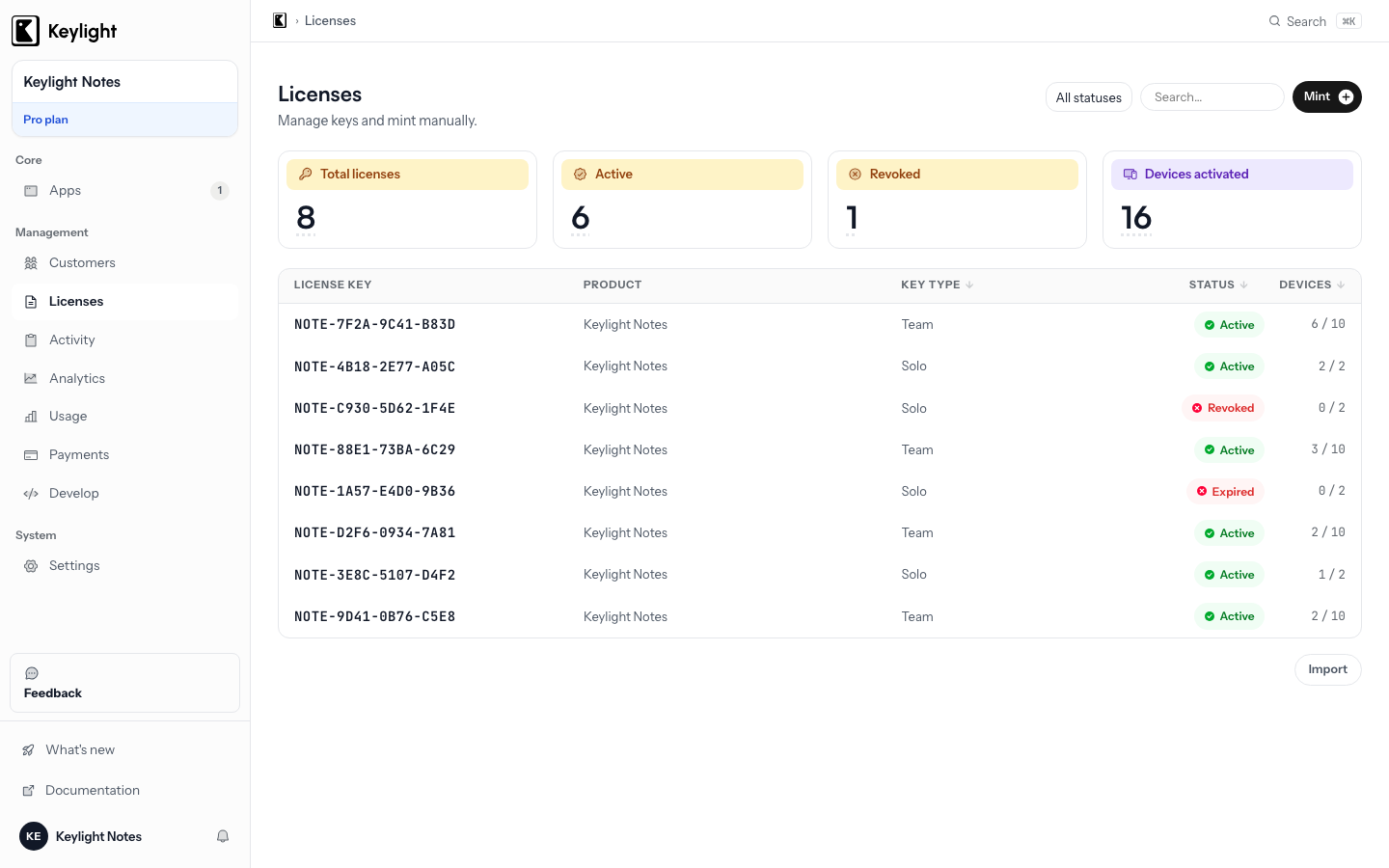
- Minted on payment
- A Stripe payment automatically issues a signed key — no webhook glue to maintain.
- Verified offline
- Your app ships with the public key and verifies licenses locally, with no runtime server call.
- Revocable
- Refunds and chargebacks mark the key revoked; the next revalidation rejects it.
- Device activation limits
- Each key carries an activation cap; activations are tracked per device.
Updated March 2026
What a Keylight license key is
A Keylight license key is not a random string you validate by checking a database. It is a cryptographically signed lease — a small JSON document that encodes exactly what the customer purchased, when it expires (if ever), how many devices it covers, and which features it unlocks. The signature is produced using an Ed25519 private key held exclusively on Keylight’s servers. Your app ships with the corresponding public key baked in.
When your app receives a license key from a customer, it reads the lease payload, verifies the signature against the embedded public key, and either accepts or rejects the license — entirely locally, without making a network request. The signed lease shape looks like this:
{
  "id": "lk_01hx9z4bqncktjvx6a2r3p8wy",
  "customerId": "cus_Qk3mN9vTpLx2Zr",
  "productId": "prod_macos_pro",
  "activationLimit": 3,
  "activationCount": 1,
  "features": ["pro", "export"],
  "issuedAt": "2026-05-15T09:12:00Z",
  "expiresAt": null,
  "revoked": false,
  "sig": "MEUCIQDkP3...base64url...=="
}
The sig field is the Ed25519 signature over the canonical JSON of the remaining fields. Any tampering with the payload — adding a feature, changing activationLimit, flipping revoked to false after a refund — produces a signature mismatch that your app detects immediately.
This model has a concrete advantage over opaque license strings validated by an API call: it works when the user has no network access, and it does not add a round-trip to every app launch. The private key never leaves Keylight’s servers; there is nothing for an attacker to extract from your binary.
Issued automatically by Stripe payments
When a customer completes a Stripe Checkout session for your product, Keylight receives the checkout.session.completed webhook, resolves which product and license tier was purchased, mints a signed lease, and delivers it to the customer — all within a few seconds of the payment confirmation.
There is no webhook handler you need to write and maintain. You connect your Stripe account to Keylight, map your Stripe products to Keylight license tiers, and the issuance pipeline runs automatically. If Stripe retries a webhook, Keylight is idempotent: the same Checkout session always produces the same license ID, so your customer does not receive duplicate keys.
The customer receives their license key by email and can also retrieve it at any time from their customer portal. Your dashboard shows every issued key, the customer it belongs to, the number of active device activations, and whether it has been revoked. You never need to run a cron job or a reconciliation script.
Verified offline by your app
Offline validation is the reason signed leases exist. A macOS app that calls home on every launch will eventually fail to launch — the server is unreachable, the user is on a plane, the company firewall blocks outbound traffic on your port. Users expect desktop software to work without network access.
Because the lease is signed, your app can verify it locally using only the public key that ships inside the app bundle. The verification algorithm is straightforward: parse the lease, check the signature, check revoked, check activationLimit against activationCount, check expiresAt if present. If all checks pass, the license is valid.
Keylight’s Swift SDK handles all of this through the manager you create at startup:
// At app launch — checks cached lease, then revalidates online if needed
await licensing.checkOnLaunch()

switch licensing.state {
case .licensed:
    // Activate the licensed features
    enableFeatures()
case .trial(let daysLeft):
    showTrialBanner(daysLeft: daysLeft)
case .expired:
    showRenewalPrompt()
case .invalid:
    showActivationSheet()
}
The SDK caches the last valid lease on disk so the app stays licensed across restarts, even with no network. It revalidates in the background when the network is available, picking up any revocation that has happened server-side since the last check. A full treatment of the validation model is in Offline License Validation.
Revocation and device limits
When a customer requests a refund and Stripe processes it, Keylight receives the charge.refunded or checkout.session.expired event and immediately marks the associated license as revoked. The revoked flag in the signed lease is authoritative on the server side; the app picks it up on the next online revalidation.
The offline-first design means revocation is not instantaneous — a customer who has no network access continues to use their cached, previously-valid lease until the app revalidates online. This is a deliberate tradeoff: instantaneous revocation requires a server call on every launch, which breaks offline usage. In practice, most customers reconnect within hours, and the revocation is enforced then.
Each license key carries an activationLimit set at issuance. A standard tier might allow three device activations; an enterprise tier might allow unlimited. When a customer activates on a device, Keylight increments activationCount and records the device fingerprint. If activationCount reaches activationLimit, the server rejects the activation request and the SDK surfaces an error through activationError so the app can prompt the customer to deactivate an old device or upgrade their license.
Customers can manage their activations through the customer portal without involving you. Deactivating a device decrements the counter, freeing a slot for a new machine. You set the limit per product tier; Keylight enforces it.
Adding it to your app
The integration surface is intentionally small. You add the Keylight Swift package to your Xcode project, call Keylight.manager(...) once at startup with your SDK key and the public key from your dashboard, and drive your UI from the returned LicenseManager.
import KeylightSDK

@main
struct MyApp: App {
    let licensing = try! Keylight.manager(
        sdkKey: "sdk_live_...",
        tenantId: "acme",
        productId: "myapp",
        keyPrefix: "ACME",
        trustedPublicKeyBase64: "lk_pub_MCowBQYDK2VwAy...",
        trialDurationDays: 14,
        branding: .init(appName: "My App", purchaseURL: URL(string: "https://acme.example.com/buy")!, supportEmail: "[email protected]", tintColor: .blue)
    )

    var body: some Scene {
        WindowGroup {
            ContentView()
        }
    }
}
The SDK key and public key are the only credentials that live in your app bundle. Your Stripe secret key and the Ed25519 private key stay on Keylight’s servers. There is no API key in the client, no secret to rotate after a breach, and no signing logic to implement yourself.
If you are building a licensing flow from scratch, the Software License Keys Explained guide covers the full conceptual model — what makes a signed lease more robust than a random string, how online and offline validation interact, and when you need each. When you are ready to connect your Stripe account and ship your first licensed build, Pricing shows the available plans.
Keylight’s free tier covers the first 50 activations with no credit card required, so you can integrate and test end-to-end before committing to a paid plan.
Frequently asked
How are Keylight license keys signed?+
Each license is an Ed25519-signed lease. Your app holds the public key and verifies the signature locally.
Do license keys work without internet?+
Yes. Verification is a local signature check. Revocation is picked up on the next online revalidation.
Start licensing your app today
Drop in the Swift SDK, point it at your dashboard, and sell paid apps in under a minute. Free forever tier included.
Start Free