

Settings that really came from your dashboard
Your trial length and free tier arrive in the app signed by your dashboard. Edit the cached file and the app ignores it. One switch per SDK, off by default.
Start Free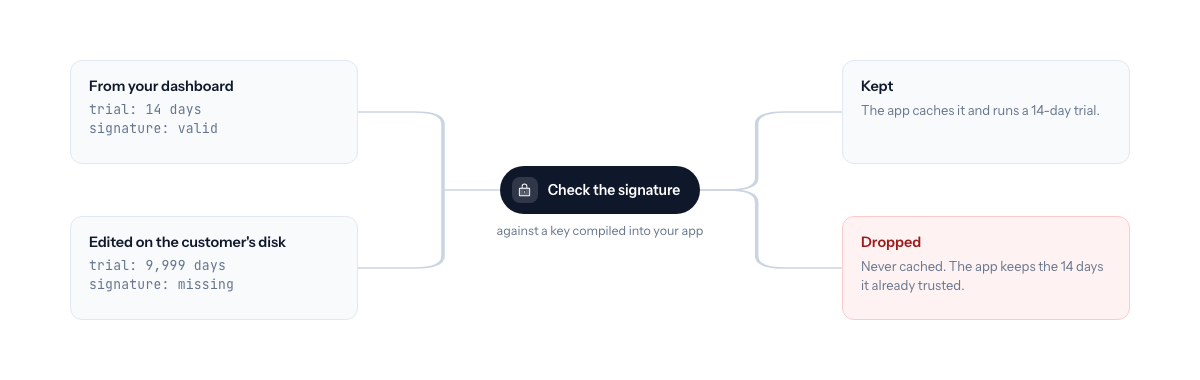
- Closes the edited-cache trick
- A settings file stretched to a 9,999-day trial or flipped to a paid tier fails the check and is thrown away.
- Pinned keys
- The app trusts only the key you compiled in. Nothing fetched over the network can stand in for it.
- Safe defaults on mismatch
- A settings body that does not verify is never cached. The app keeps its compiled-in value. It does not crash and it does not lock anyone out.
- Same behavior in every SDK
- Swift, JavaScript, Rust, C#, and C++ verify the same settings the same way, proven by shared conformance vectors.
Updated September 2026
The attack, in one paragraph
Your app reads its trial length and free-tier flag from your dashboard and caches them on disk. That cache is a plain file. Open it, change the trial from 14 days to 9,999, save. Or flip the free-tier flag on a product where you decided free means nothing. The app reads its own cache and believes it. The same trick works one layer up: anything sitting on the network path can answer the app’s settings request with whatever number it likes. Nobody needs to touch your license key. They only need to edit a setting.
Signed product settings make that edit fail. Every settings body the app sees, whether it arrived on a validate, on the keyless beacon, or on an explicit refresh, carries a signature from your dashboard. The app checks it against a key you compiled in. A body that does not verify is dropped before it ever reaches the cache.
One switch per SDK, off by default
Turning it on is one line. In JavaScript:
const kl = new Keylight({
  tenantId: "your-tenant",
  productId: "your-app",
  trustedKeys: { k1: "<your pinned public key>" },
  requireSignedConfig: true,
});
The same switch exists in Swift, Rust, C#, and C++ under the same name, in whatever shape that language’s config takes. The Licensing Electron and Node apps post walks through the JavaScript version end to end.
It ships off for a reason. Keylight signs an app’s settings only once that app has a trial length set in the dashboard. Turn the switch on for an app without one and every legitimate response is rejected, which leaves the install pinned to its compiled-in value. The order is: set a trial length in the dashboard, pin the key, then enable the switch.
Pinned keys
What you pin is your tenant’s public signing key. It is published on your Keylight tenant, and each SDK has a helper for fetching it while you set up the project. Copy the value into your build.
Do not fetch it at runtime and trust whatever comes back. A key fetched over the same connection that serves the settings can be forged by whoever forges the settings. The helper exists to bootstrap a project, not as a trust root. Verification trusts only compiled-in keys.
Rotating to a new key does not break shipped builds. An old build that only knows the old key keeps the last settings it verified. That is a freeze, not a failure, and it is the behavior you want when you cannot force an update.
What happens on a mismatch
Nothing dramatic. The app keeps the last settings it verified, or its compiled-in default if it never had any. Nothing unverified is written to disk. The app does not crash, and no customer is locked out because of a bad settings response. It simply refuses to believe an unsigned number.
One honest limit. Signing makes editing pointless. It does not make reading impossible, and the at-rest cache stays plain. Nothing in that file is secret anyway. The license key your paid entitlements ride on has its own signature, and that is where the real boundary has always been.
Same result in every SDK
Every Keylight SDK verifies the same settings payload against the same golden vector captured from production. A settings body that verifies in JavaScript verifies identically in Swift, Rust, C#, and C++. You do not have to trust five implementations. You trust one check, run five times.
When to turn it on
Before launch, not after the first trial-stretching trick shows up on a forum. The checklist is short:
- Set a trial length on the product in the dashboard, even if you also compile one in. This is what makes Keylight sign your settings.
- Pin the public key into your build.
- Turn on the switch.
The settings it protects are on the free trials and free tier page. Signed product settings are included on every Keylight plan. See Pricing, starting at $19/month. For where the settings cache lives in a desktop app, see Licensing for Electron Apps.
Frequently asked
What does signed config protect against?+
Someone editing the settings the app cached on disk, or answering the app's settings request from the network, to stretch a trial or turn on a tier they did not pay for. With the switch on, a settings body without a valid signature from your pinned key is dropped.
Why is it off by default?+
Keylight signs an app's settings only once that app has a trial length set in the dashboard. Turning the switch on before that rejects every legitimate response and pins the install to its compiled-in value. Set a trial length first, then enable it.
What happens if the signature does not match?+
The app keeps the last settings it verified, or its compiled-in default if it never had any. Nothing unverified is ever written to the cache. No crash, no lockout.
Does it slow down the app?+
No. The check runs on the settings the app already receives on every validate and on the keyless beacon. There is no extra request.
Start licensing your app today
Drop in the Swift SDK, point it at your dashboard, and sell paid apps in under a minute. Free forever tier included.
Start Free