

The upgrade shows up without a restart
A customer buys a higher tier in the portal and the paid feature is just there. No relaunch, no second key to paste, no support email.
Start Free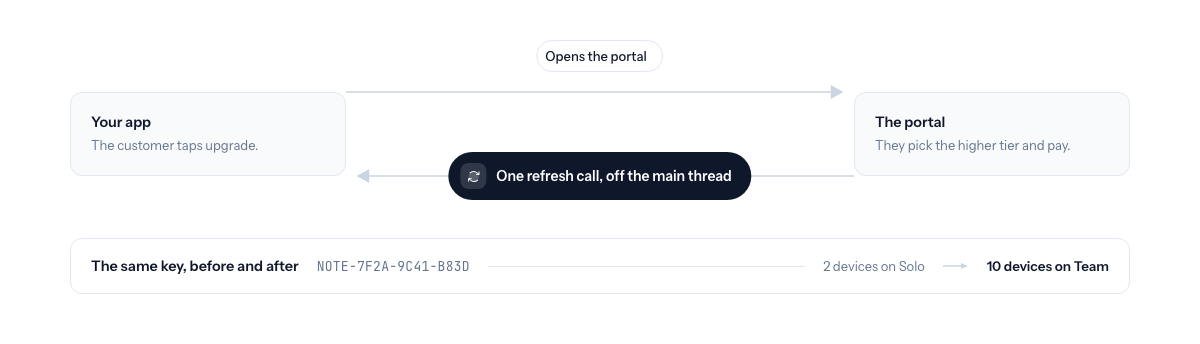
- One call after the purchase
- When the customer comes back from the portal, the app asks once and the new entitlements arrive. Off the main thread, so the UI never stalls.
- Same key for life
- The key the customer already has is the key that carries the higher tier. Nothing to email, nothing to re-enter.
- Downgrades handled the same way
- A plan that drops refreshes the same way. Free is the floor, so the app keeps working with the free features.
- Every SDK
- Swift, JavaScript, Rust, C#, and C++ all expose the refresh. The API path validates live, so it needs no refresh at all.
Updated September 2026
The old experience, and the new one
A customer on your Standard tier wants Pro. They pay. Then one of two things used to happen. Either the app told them to quit and reopen, or an email arrived with a second key to paste in. Both work, both feel like 2009, and both generate the same support message: “I paid, where is it?”
The new experience is that the Pro menu item is just there. The customer pays in the portal, comes back to the app, and the paid feature appears. No relaunch. No second key. No email.
How it works from your seat
Your app opens the hosted customer portal for the upgrade. When the customer comes back, the app makes one call: refresh after upgrade.
That call snapshots the current entitlements and state, then checks with Keylight for a short bounded window until either one changes. The moment the new tier shows up, it returns and your UI redraws. If nothing changes within the window, it returns quietly and the customer can try again. If no license is stored at all, it returns immediately without a network call.
It runs off the main thread in every SDK. A Rust CLI can afford to wait. A desktop UI cannot, so you spawn it and read the result. The Rust post shows the spawn pattern. In Electron the renderer asks, the main process refreshes, and the paid feature appears.
Same key, higher tier
The customer keeps one key for life. An upgrade does not issue a second license. It changes what the existing key unlocks, and the signed lease the app holds is what carries the new tier. Nothing to email, nothing for the customer to find in an old inbox, nothing for you to reconcile between two license rows.
That is also why the refresh is safe to call as often as you like. It is not minting anything. It is asking whether the key the app already has now means more than it did a minute ago.
Downgrades and cancellations
The same refresh answers the other direction. When a plan drops, the app receives the smaller entitlement set and the paid feature goes away on the next check. With the free tier on, that customer lands on a working free app, not a locked one. Free is the floor. They stay a user, and the upgrade path is one click away when they want it back.
The paid upgrades for version 2 post covers how to price a major version so the upgrade refresh is the only thing your customers notice.
Portal today, in-app checkout not yet
Be precise about where the purchase happens. Today the upgrade is bought in the hosted portal, under your brand. Your app opens it, the customer pays, and the app refreshes when they come back. Keylight does not provide an in-app checkout screen yet. If you need to pick a tier and pay without leaving the app, that is not something to promise your customers today.
In-app upgrade refresh is included on every Keylight plan. See Pricing, starting at $19/month. For how it feels inside a desktop app, see Licensing for Tauri Apps.
Frequently asked
Does the customer need a new license key after upgrading?+
No. The upgrade changes what the existing key unlocks. The app refreshes its entitlements and the customer keeps the one key they already have.
How does the app find out about the upgrade?+
Your app calls the refresh once after the customer returns from the portal. It checks for a change in tier or state for a short bounded window and returns as soon as one shows up, without blocking the UI.
What happens on a downgrade or cancellation?+
The same refresh returns the new, smaller entitlement set. With the free tier on, the customer drops to a working free app rather than a locked one.
Can the customer buy the upgrade inside my app?+
Today the upgrade is bought in the hosted customer portal. Your app opens the portal, the customer pays, and the app refreshes when they come back. An in-app checkout screen is not something Keylight provides yet.
Start licensing your app today
Drop in the Swift SDK, point it at your dashboard, and sell paid apps in under a minute. Free forever tier included.
Start Free